Technological innovation has always been an integral part of Ed Ruscha’s Streets of Los Angeles (SoLA) photographs, now held at the Getty Research Institute (GRI). These photographs are now contained in two archives created by the artist according to the streets they record (for the purposes of this book, they are referred to collectively as the SoLA Archive).1 As discussed in Zanna Gilbert and Jennifer Quick’s contribution to this volume, Ruscha’s approach to systematically photographing Sunset Boulevard and other major thoroughfares—which began in earnest in 1966 and continues today—has consistently relied on technology to respond to the evolving needs of his project.2 The ambitious scope inherent in programmatically capturing the streetscapes of the Los Angeles area meant Ruscha had to quickly move beyond the standard manual-photography shooting processes to literally cover a lot of ground as efficiently as possible. Ruscha’s technological innovations included using a moving pickup truck to serve as the platform for taking pictures, employing a motorized drive to advance the film, and installing a mechanized camera back capable of holding very long lengths of film, reducing the need for frequent reloading. Ruscha transformed his art practice by evolving his process to match his ambition. It is thus fitting that the SoLA Archive has similarly stimulated a need for Getty to meet necessity and ambition with innovation.
Getty’s mission is to “share art, knowledge, and resources with the public.”3 Facilitating the discovery of and access to our collection materials is one way that we strive to fulfill that mission. We are fortunate to provide an institutional home to culturally significant archives; however, the scale of many of these collections makes it impossible to create adequate metadata for every piece of documentation they contain.4 Metadata is the infrastructure and interface for accessing digital resources.5 Descriptive metadata6 drives the ability to find; it enables researchers to discover, identify, and select materials for study. In today’s online environment, users increasingly expect the existence of information, whether contained in an image, document, or another format, to be found through keyword searching. The belief that something doesn’t exist if it isn’t found in a Google search extends to archival material for general users. That said, the ability to make every item in a collection discoverable online is hampered by the herculean task of manually creating descriptive metadata.7 Getty is not unique in this situation. Current archival practice does not typically assign descriptive metadata to every item in a collection. Rather, the collection is described as a whole, and then strategic decisions are made on how best to describe its components at the container level (that is, boxes, folders, and so on). Since descriptive metadata is assigned to groups of material rather than to items within a group, the burden is placed on users to sift—either physically or digitally—through at times massive volumes of material. For example, the photographs in the SoLA Archive are organized by the shoot date for each street, but the individual images resulting from each shoot are not described.
Ruscha’s immense trove of images is a perfect example of this usability challenge, forcing and focusing an interrogation of our traditional processes for making collections available. We had many questions: How could we provide more generous inroads to this collection to enable finding a needle in a haystack? Users might want to pinpoint images of famous locations such as the Whisky a Go Go, Schwab’s Pharmacy, or the Cinerama Dome, and to chart changes to them over time. How could we facilitate that without item-level metadata and a legion of archivists to do that work? How were we going to drive people—people who may not know the artist Ed Ruscha—to this amazing content documenting our city? How could we exploit the collection to provide useful and engaging interfaces to both the nostalgic general public and to scholarly audiences? To borrow a phrase from Ruscha, what were the “vivid possibilities”?8
The questions that the SoLA project prompted formed in tandem with the growth of Getty’s ambitions in three areas: to improve our ability to work at scale, to provide more granular access to our archival collections, and to better leverage our collections to reach new audiences outside of traditional library and archival interfaces. This essay describes how the Getty team approached archiving the SoLA materials by innovating our capture, metadata generation, and presentation methods to exponentially increase access to this collection of images while also evolving our own technical infrastructure and practice along the way.9
Collection Background
In 2011, the GRI acquired Ruscha’s long-running photographic projects documenting the streets of Los Angeles. The first archive, Edward Ruscha Photographs of Sunset Boulevard and Hollywood Boulevard, 1965–2010, comprises material Ruscha produced during twelve shoots chronicling the nearly twenty-five-mile length of Sunset Boulevard and four shoots documenting twelve miles of Hollywood Boulevard. The second archive, Edward Ruscha Photographs of Los Angeles Streets, 1974–2010, includes Ruscha’s shoots of three streets in the mid-1970s: Santa Monica Boulevard, the Pacific Coast Highway, and Melrose Avenue, as well as the shoots he has made since 2007 of over forty additional streets. These later shoots represent more than twenty-five major thoroughfares such as Sepulveda, Pico, Olympic, Wilshire, La Cienega, and Beverly Boulevards, as well as “suites” of streets in areas such as Chinatown, La Brea, and Silver Lake.
Taken together, the materials in these two archives demonstrate Ruscha’s sustained interest in producing visual records of some of the city’s main thoroughfares with a concentration on those running through Los Angeles’ Westside. The variety of raw materials present—including negatives, contact sheets, videotapes, and film reels—reflects the evolution of Ruscha’s documentation processes from still to moving film. Also found in the SoLA Archive are the production materials for Ruscha’s book Every Building on the Sunset Strip (1966) and two projects produced with the art dealer and gallerist Patrick Painter: Ruscha’s portfolio Sunset Strip (printed 1995) and his book THEN & NOW: Hollywood Boulevard, 1973–2004 (2005).
Processing
Processing is a fundamental step in the stewardship of an archival collection. The term processing is used in the field as a shortcut to mean gaining physical and intellectual control over the materials contained within a collection. Physical control refers to safeguarding the materials and accurately recording where materials are stored. Intellectual control includes descriptive work to assist with identifying and locating items of interest. Archival processing comprises several steps: surveying the materials to gain a sense of the scope and content of the collection; housing the materials in containers best suited to their physical needs; arranging the materials to confirm the creator’s original order; determining a logical order for them in the absence of any obvious original order; providing a framework for how the materials relate to each other and to make them searchable and retrievable by researchers; and describing the materials at the collection level (a general overview) and at the container level (or, rarely, item level) to indicate where the materials can be found within the collection and to provide a more nuanced sense of its contents. Simple preservation activities as well as more complex conservation treatments may also be performed on materials deemed at risk or to facilitate safer handling of the materials by researchers.
Both Ruscha collections were processed in 2012 by Special Collections archivist Beth Ann Guynn and volunteer Linda Kleiger. They housed the materials in appropriate containers before describing them in the finding aid. While most of the rehousing was routine, the thirteen-frame negative strips were more than double the size of standard archival negative-holder sheets, necessitating a search for custom housing. Continuous-roll negative holders that could be cut to the desired length were the solution.
Description is often an iterative activity that relies on the ability to visually access and assess the materials. Initial description that provided a more accurate and robust level of metadata initially concentrated on the still negatives, contact prints, and project documentation materials that could be viewed by the naked eye without mechanical intervention. As is the case with all original audiovisual material, the contents of the film reels (negatives and positives) could not be fully verified until they were reformatted as copies, which allows them to be safely viewed without running the risk of damaging and potentially losing the material. For the initial descriptive data, Guynn used labels and annotations on the film canisters and film leaders, cue and footage sheets, and invoices from the processing lab where the positive films were created from the negative film rolls. While this would seem to provide a significant amount of information, elements such as footage and dates vary among the different sources.
Data caught after reformatting allows the archivist to determine the most accurate information. In 2017 and 2019, digital image files on CDs were converted to JPEG format for access; they were then described in more depth in the finding aid to include the number of image files they contained, be they full contact sheets or individual frames from the film reels. The descriptive metadata generated in this processing phase not only provided the critical framework for understanding and accessing the collections but also developed the structure for the iterative metadata work that would follow.
Capture
While digitizing10 our collections supports Getty’s mission to make them accessible to a global audience, with the Ruscha collection, digitizing was crucial because the majority of the images were contained on 35mm-negative film reels. This format enabled Ruscha’s programmatic photography project to scale up but limited access to the collection; in fact, Ruscha himself has never seen most of the images in the SoLA Archive, due to the mediation needed by the format. On a practical level, the reel format made the images impossible to present to researchers within our reading rooms. Digitization was the only way to provide and ensure intellectual access to the Ruscha materials and circumvent the limitations posed by the physical format.
Selection is a key activity in the digitization process. Generally speaking, a number of criteria are taken into consideration when selecting collections or subsets of collections to be digitized, including copyright, contribution to the cultural heritage record, potential to advance scholarship, preservation of the materials, improving understanding of the materials, and potential for added functionality.11 While Ruscha’s vast SoLA Archive consists of approximately 740,000 photographs, only a subset of the collection was selected for digitization by the project team. To activate scholarly and public interest, and to free the images from the 35mm-negative reel format, about 130,000 photographs were chosen as the most comprehensive subset of Ruscha’s documentation of some of Los Angeles’ main streets between 1965 and 2010. This subset represents approximately 17 percent of the collection, including twenty-five shoots. Along with the images, select notebooks from the shoots were also digitized, providing additional context. Image formats included photographic negatives and contact sheets, but the majority were negatives spooled onto film reels.
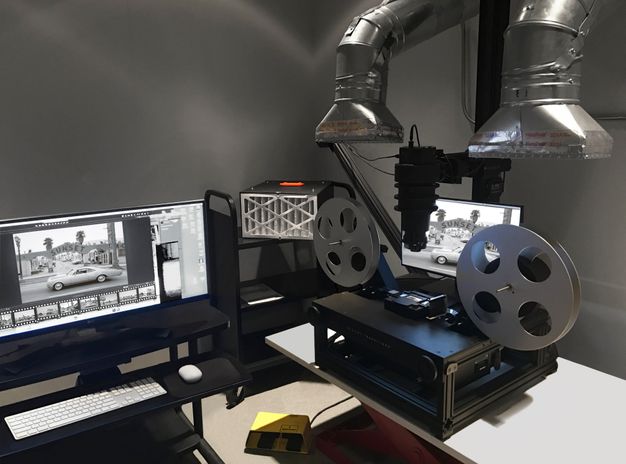
Getty’s Digital Imaging Department typically captures works on paper or objects. Working with the format and scale of the reels presented a unique challenge and an opportunity to see how much of the process could be automated. To work efficiently and ergonomically on this project, innovation was required. Chris Edwards, Getty’s former imaging architect, and lead photographer John Kiffe developed a custom imaging station in partnership with a digitization vendor. This setup included several camera enhancements needed to produce a high-resolution image12 and the replacement of a glass carrier with a metal one to gently advance the film while minimizing the potential for dust, which could distort the image made from the negative. To produce a higher rate of accuracy and reduce the postproduction handwork necessary, a device called an intervalometer, which fires the camera shutter, was connected to a trigger that took a digital photograph about every five seconds. This provided time for imaging technician Tavo Olmos to move the film into position after it was advanced automatically, resulting in more accurate cropping. Moreover, the intervalometer method could be used from a seated or standing position, making it more ergonomic than using a foot pedal or a hand trigger. It is important to note that while automation assisted in the image capture, there was still a significant amount of handwork involved to oversee and intervene in the automated process.
Innovating the capture process took an unexpected turn when about a third of the way into the project, an overwhelmingly pungent smell emanated from some reels. This was a distinct sign of vinegar syndrome, the process of chemical degradation when film gives off acetic acid as it decomposes, a potential health risk. Laura Sokolosky, from the imaging team, tested reels thought to be affected and isolated those with vinegar syndrome into cold storage to slow the decay process. Working with Linda Somerville from our risk management office, we were able to construct ventilation hoods that hovered just above each reel in the imaging studio to draw in the fumes. The resulting modification produced a steampunk-looking workstation that enabled Olmos to safely work with the reels throughout the duration of the project (fig. 3.1). While we encountered a couple of hurdles along the way, imaging ran very efficiently with a capture rate of approximately 1200 frames a day.
Following imaging, digital object files were deposited into our digital preservation system13 with descriptive, administrative, and structural metadata. Ruscha’s digital archive contains over four hundred thousand files, which include master images and two derivatives, and it comprises 27 percent of Getty’s total storage space in the preservation system. This archive’s still-image digital footprint is sixty-three terabytes, Getty’s largest to date.
Item-Level Metadata
Typically, our processing ends with the deposit of digitized content into our digital preservation system and the creation of a collection finding aid, but as mentioned earlier, we were interested in how we could use computational methods to further enrich the discoverability of this material by a broad audience. While archival processing yielded street names and shoot dates for each of Ruscha’s photography sessions (for example, “Sunset Boulevard, 2007–2010, Shoot took place from June 9 to June 13, 2007; 24.6 miles”), a typical shoot could yield between approximately four thousand and eight thousand images for researchers to sift through. More granular metadata was needed to make this collection usable, but manually describing every item contained within the collection was not feasible. However, the geospatial nature of these materials, combined with Ruscha’s mechanized process and his methodical note-taking practices, provided the opportunity for us to explore generating descriptive metadata for every image. Through working with an extended project team—which included Stace Maples, assistant director of Geospatial Collections and Services at Stanford University Libraries, and an external vendor—we were able to realize this vision of providing descriptive metadata for every frame of the project.
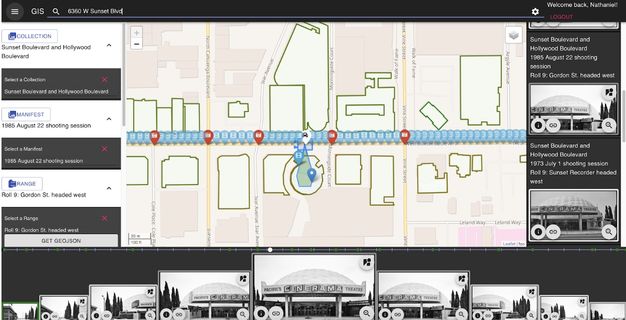
Ruscha’s own documentation was key. It provided us with the start and stop locations of each photo shoot as well as the exact height of the camera and the trigger speed used. With this information, our vendor developed a mapping tool that placed the images from the beginning and end of a particular shoot at specific points on the map, allowing for the interpolation of all the street views in between (fig. 3.2). The tool leveraged existing publicly available datasets to provide building outlines and the routes used for interpolation.14 While lining up images between two points on a street was an automated process, there was a significant amount of manual placement to adjust the interpolation and a manual review to verify the accuracy of the automated process. The review included a technician inspecting the thumbnail and finding an easily identifiable landmark, such as a street sign or address number. With a landmark noted, Google Maps was used to compare the nonchanging landmark using Street View technology. If the image was not at the correct point on the map, the error was identified by human eyes and manually moved into the correct location by the technician. The realignment would then cascade through the set of interpolated images. This computer-assisted method produced latitude and longitude coordinates for each of the 130,000 images with an accuracy rate within ten feet. The coordinates were then cross-referenced with the tax data from the L.A. County Office of the Assessor to connect the human-readable address data and Assessor Identification Number (AIN) for the property to the dataset.
Beyond generating the geolocations and connecting the addresses and AINs, the images were processed using Google’s Cloud Vision application programming interface (API). An API is a piece of software that allows for two or more applications to communicate with each other for various services. In this case, the Cloud Vision API was used to “read” the images. Using the API’s optical character recognition (OCR) service, words found in the Ruscha images (e.g., on street signs, billboards, marquees, and shop signs) were transcribed into text; and using the computer vision service labels, or tags (e.g., car, tree, and dog), identifying objects in the images were created. Both services created additional metadata that could be used to enhance the search functionality to locate specific images containing keywords.
This project was our first use of computer vision on collection materials. These services are not a panacea. We had issues with unintelligible text due to image angles, generic labels (the top five being tree, black and white, sky, residential area, and monochrome), and bizarre object identifications (snow in Los Angeles!).15 While the computer vision output lacked specificity, analysis on a small subset of the labels suggested an 80 percent accuracy rate. These methods proved to be useful for generating additional pathways into the collection (see “Description as Data: What the Tags See in the SoLA Archive,” this volume).
As with the image capture, item-level metadata generation was a semiautomated and somewhat laborious manual process. While the algorithm used to interpolate the images significantly advanced this work, the human component was essential for the accuracy of the image placement and to connect each image to the correct address. Processing an archival collection in this manner is unusual. Bespoke application development to generate item-level metadata for a specific collection is not typically done, given the resources that are required, both human and fiscal. What made this project possible were the specific geospatial affordances of Ruscha’s work, his detailed shoot documentation, and Getty’s ambition to experiment with new methods to amplify the SoLA Archive.
Artificial intelligence (AI)—which the Google Cloud Vision API is based on—or, more specifically, computer vision (a subset of AI), has emerged as an effective tool for processing at scale. Since we executed this project, AI tools have continued to advance exponentially across industries, including libraries and archives.16 The takeaway with this AI project, which was executed in 2018–19, still applies today: using AI is not a silver bullet and underscores the need for interrogation and analysis. Automation can only get you so far, and human labor is required if accuracy and quality are desirable outcomes. This combination of technology, innovation, and the human touch produced a rich set of metadata that allows researchers deeper access into the collection, and by connecting to external datasets, a network of research opportunities was built.17
Systems
As discussed, descriptive metadata is the foundation on which our collections are discovered. That metadata must reside in Getty’s systems of record for management and be made available on public-facing interfaces. Libraries and archives are governed by community standards and systems for specific use cases: bibliographic, archival, preservation, and access. There is no single system that can solve the complex data management needs of a twenty-first-century cultural heritage and research institution. In our ecosystem of systems and standards,18 traditionally created metadata has a home, but none of the systems or data models could accommodate the nonstandard, item-level metadata we were generating, such as transcriptions, addresses, coordinates, and camera bearing.
Additionally, we knew that our current platform for providing public access to both our finding aids and our digital collections would be inadequate for the level of discoverability and direct access imagined for the SoLA Archive. Our Collection Inventories and Finding Aids interface was running on outdated technology and needed replacement. Furthermore, our digital preservation system was used to give access to the GRI’s digital collections. This required users to navigate the collection based on how the files were deposited into the system, which, as mentioned earlier, is a less-than-ideal user experience. In this instance, it would require browsing through a reel’s worth of images that numbered in the thousands to locate specific items of interest.
This project dovetailed with Getty Digital’s initiative to advance our data and technical infrastructure, with a goal of moving linked data into production using the Arches data management platform. Arches, built by the Getty Conservation Institute and the World Monuments Fund, is a flexible, linked data-aware system built on community standards. The platform is ontology-agnostic, meaning it doesn’t come prebuilt with a database schema. This allowed us to build a data model specific to the metadata we needed to store that followed a cultural heritage standard.19 Arches filled an important gap in our data-management ecosystem. As the inaugural production instance of the platform at Getty, Arches was implemented to manage the metadata generated from the SoLA Archive.
With a standards-based, item-level data model and unique identifiers for each image in the collection that were cross-referenced to metadata across the ecosystem,20 we were poised to deliver a new discovery experience and change the paradigm for how Getty delivers our digitized archival content.
Image Delivery
Beyond metadata, there was also the need to provide on-demand digital access to the hundreds of thousands of photographs; to support close looking via deep zoom; to supply thumbnails for search results and other summary displays; and to enable reuse of this collection across multiple platforms. To do all this, we decided to utilize the International Image Interoperability Framework (IIIF), a set of standards developed within the cultural heritage community to provide consistent patterns for the access to and presentation of digitized images.21 This standard allows projects to take advantage of existing software applications22 with interfaces that allow for complex behavior such as deep zoom, image comparison, and annotation—enabling the Ruscha images to be used with tools scholars already had access to and were potentially comfortable with. It also allows metadata to be associated with an individual image and with sequences of images, providing a mechanism beyond archival description or filename conventions to order and display images within the context of the negative strips and film reels that hold the physical photos.
Access: Digital Archive Navigation Application (DANA)
These tools and standards built a foundation for access to images, image sequences, and metadata. What remained was to put in place a mechanism for human access and discovery. Initially, we had hoped to use a software application developed by Getty for the Harald Szeemann Papers at the GRI.23 The Digital Archive Navigation Application (DANA) used the sequence information provided by IIIF to create an access interface for the archival finding aids. On initial review, this seemed an adequate and simple solution: the structure provided by the standard was sufficiently rich to capture the archival hierarchy, display metadata, and provide access to the digitized images. However, we quickly realized that the level of interactivity we wanted would be difficult to achieve. IIIF is a brilliant presentation mechanism for sequencing images, but the SoLA Archive was not just a sequence of images—the images depicted places with their own data. The complex semantic relationships among images, places, and times captured through the metadata enhancement process would not fit within the IIIF framework without custom extensions, which would minimize the benefit of using the standard.
Access: Research Collections Viewer + Linked Open Data
Instead, we designed a system capable of integrating information across three different systems, each designed to meet specific disciplinary needs: Our digital preservation system represented the images as information objects worthy of long-term preservation, but it did not contain the descriptive details of each image. The archival information management application held the finding aid, but it considered the data as a digital proxy for the physical archive of boxes and reels. And Arches, our item-level metadata repository, held complex computer-generated information about individual negatives, but it lacked context for how this data might be interrelated.
We considered a custom interface and API for the SoLA Archive but rejected that solution due to concerns about sustainability—Ruscha’s archive is only one of hundreds of rich archival collections at the GRI, each with their own context and specific concerns, and while we had the capacity to build such a system, we knew we couldn’t sustain the software-engineering resources needed to maintain it while also building what was needed for the next archive.24 Instead, we developed a generic archival viewing solution with support for item-level metadata, IIIF images, and the ability to provide contextual enhancements for specific types of metadata.
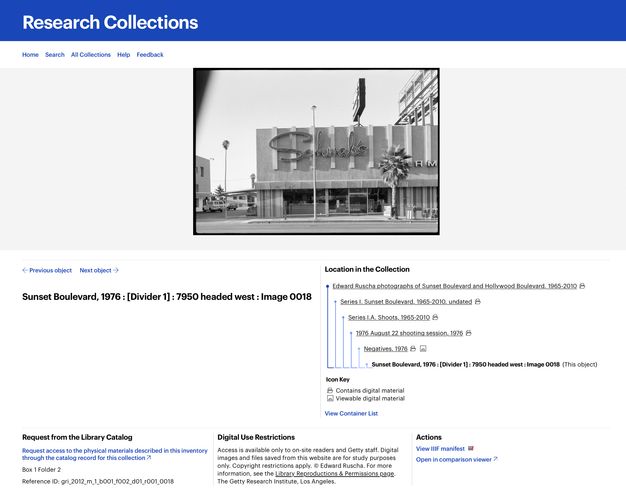
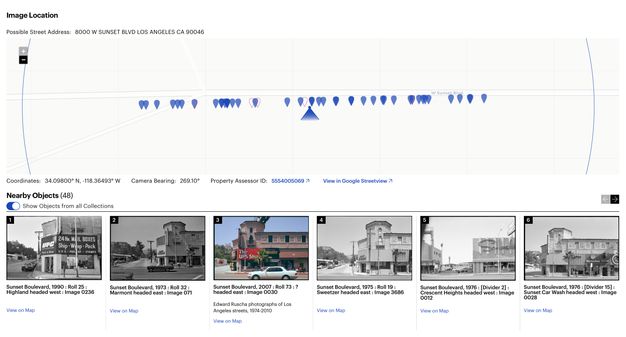
To meet this need, we identified a single data model that was capable, alongside IIIF, of bridging our three systems of record—one built on top of an existing standard and community. Though several had been considered,25 we chose Linked.Art, a Linked Open Data (LOD) profile of the CIDOC CRM.26 This standard was sufficiently flexible to support both item-level metadata and archival hierarchy, and it used the same technology as our IIIF infrastructure, providing efficiencies for the engineering team. Once an approach was identified and the data across the three systems was transformed into this standard, we developed a software interface named the Research Collections Viewer (RCV) (figs. 3.3, 3.4).27 This interface was intended to be used by scholars and professionals familiar with archival research and finding aids; our user research28 showed that this audience was primarily interested in searching and browsing the material within an archival context. This meant the interface used the physical arrangement as the primary organizing principle for the data, with full-text and keyword search as a secondary access mechanism. It was not Ruscha-specific, but it did allow for surfacing geospatial data via map displays, and it supported discovery through surfacing contextual relationships such as physical proximity.
Access: “12 Sunsets”
There were opportunities presented by the SoLA Archive, however, that would not be taken advantage of in this framework—for example, the correspondence between space and time across photos would be difficult for users to understand. We also knew that while an archival presentation was often confusing or off-putting to nonscholarly audiences, the archive could appeal beyond the scholarly community if only there was a way to make people aware of it.
To meet these needs, Getty worked with Stamen Design to build a web application called “12 Sunsets: Exploring Ed Ruscha’s Archive”29 that took advantage of the unique characteristics of the collection and pulled design cues from the history contained in the SoLA Archive, such as Thomas Guide street maps, Every Building on the Sunset Strip, and even Ruscha’s truck (fig. 3.5). The interface allows a user to “drive” a digital representation of Ruscha’s truck up and down Sunset Boulevard, seeing the photos on either side of the road. Users can also select photos from a specific year, or even compare multiple years by stacking them, a feature inspired by the display in Ruscha’s THEN & NOW (2005) (see fig. 2.22).
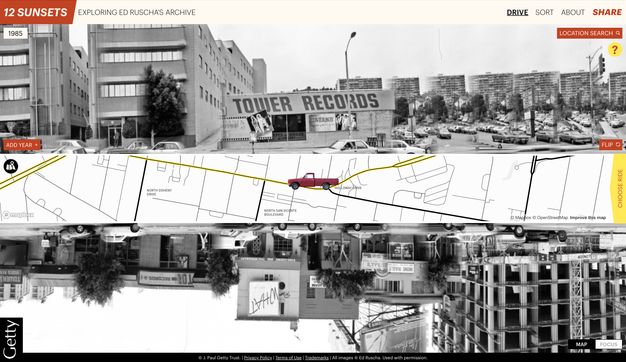
By taking advantage of OCR and image tagging, searching for words or objects within photos is possible. This capability, expressed in an innovative “mad-lib” structure, lets users recontextualize the collection and discover unexpected connections between images, despite the idiosyncratic nature of the computationally generated metadata.
While “12 Sunsets” uses the same metadata and image services, it was designed within a different sustainability paradigm, with a two-year expected duration. By allowing the site to have a known end date, it provided freedom to explore the possibilities of technology without fear of the long-term implications of maintenance that were prohibitive in the case of a custom archival viewing environment.
Conclusion
The digitization of the SoLA Archive has opened the door to many possibilities already, and more remain untapped in this rich trove of information. Throughout the process, Getty has done its best to ensure that the collection is designed for use—through digital technology as data, intellectual access as archival material, and discovery points targeted at a variety of audiences. Ruscha’s archive challenged Getty to rethink our data infrastructure and discovery platform, propelling us to embrace new methods and technologies that now undergird our work. Throughout the rest of this volume, we hope that our efforts have enabled others to discover new stories through Ed Ruscha’s lens.
Notes
-
For the collections’ finding aids and to access digitized photographs, see Edward Ruscha Photographs of Sunset Boulevard and Hollywood Boulevard, 1965–2010, 2012.M.1, https://www.getty.edu/research/collections/collection/100001; and Edward Ruscha Photographs of Los Angeles Streets, 1974–2010, 2012.M.2, https://www.getty.edu/research/collections/collection/100071. ↩︎
-
Zanna Gilbert and Jennier Quick, “Ed Ruscha’s Streets of Los Angeles: A Narrative History,” this volume. ↩︎
-
“About,” Getty, https://web.archive.org/web/20240101015409/https://www.getty.edu/about/. ↩︎
-
As a point of comparison, the J. Paul Getty Museum’s object collection contains about 130,000 objects with a corresponding catalog record for each object. At the time of publication, the GRI’s total archival footprint extends over approximately 80,000 linear feet, or 228 football fields, containing millions of items. ↩︎
-
Jennifer Schaffner, “The Metadata Is the Interface: Better Description for Better Discovery of Archives and Special Collections, Synthesized from User Studies," (Dublin, OH: OCLC Research, 2009), https://doi.org/10.25333/dp1k-3348. ↩︎
-
Metadata is data about data. Descriptive metadata provides information about the content and context of data. Examples of metadata elements include title, creator, date, address, and keywords. ↩︎
-
Schaffner, “Metadata,” 9. ↩︎
-
Getty, “On Ruscha’s Streets of Los Angeles Archive,” 12 September 2019, educational video, 4:09, https://web.archive.org/web/20230415181411/https://www.youtube.com/watch?v=MHo63-eAF6w. ↩︎
-
This essay is written for a general academic audience. The endnotes provide more technical details for specialists in this area of work. ↩︎
-
The term digitizing in this context is the process of capturing an image, but it also involves a series of activities for each image: selection, preparation, creating technical and descriptive metadata, digital conversion, and using systems of record for management and preservation. ↩︎
-
Dan Hazan, Jeffrey Horrell, and Jan Merrill-Oldham, Selecting Research Collections for Digitization—Full Report (Alexandria, VA: Council on Library and Information Resources, 1998), https://web.archive.org/web/20240126185546/https://www.clir.org/pubs/reports/hazen/pub74/. ↩︎
-
A 9000-pixel file on the long side. ↩︎
-
Getty uses Rosetta, the Ex Libris digital preservation system. ↩︎
-
LARIAC5 Data provided building outlines for the various L.A. streets, while the routes used for the interpolation are based on the TIGER/Line Shapefiles dataset. “LARIAC5 Documents & Data,” Los Angeles Region Imagery Acquisition Consortium, https://lariac-lacounty.hub.arcgis.com/pages/lariac5-documents-data; and “Tiger/Line Shapefiles,” United States Census Bureau, https://www.census.gov/geographies/mapping-files/time-series/geo/tiger-line-file.html. ↩︎
-
Nathaniel Deines, “Does It Snow in LA?,” Getty Iris, 7 October 2020, https://web.archive.org/web/20221128204236/https://blogs.getty.edu/iris/does-it-snow-in-la/. ↩︎
-
“Librarian of Congress and Others Testify on Use of Artifical Intelligence,” C-SPAN video, 1:01, 24 January 2024, https://www.c-span.org/video/?533151-1/librarian-congress-testify-artificial-intelligence#. ↩︎
-
The set of metadata from these processes was output as GeoJSON and included the following: coordinates, camera bearing, Google Maps URL, tags, OCR, color metadata, AIN, depicted address, among other ancillary data, such as confidence scores and vertices, provided by the services. ↩︎
-
Getty creates Encoded Archival Description (EAD)–compliant finding aids in ArchivesSpace; MARC collection-level bibliographic records are submitted to WorldCat and ingested into Alma, our library services platform; bibliographic records and our finding aids are indexed and made available via our Library Catalog, which is a Primo implementation. ↩︎
-
The data model used is based on Linked.Art (https://linked.art/), a profile of the CIDOC CRM. ↩︎
-
A bespoke application called the ID Manager was built to manage data references across the ecosystem to marry metadata for an individual item from different platforms. ↩︎
-
IIIF, described at https://iiif.io, includes two relevant APIs: the Image API, which provides a pattern for requesting specific sizes or crops of the images; and the Presentation API, which allows images to be placed in a hierarchical structure, with display metadata associated with each image or the hierarchy as a whole. Together, these make up an “IIIF manifest,” which is a machine-readable file at a specific URL that can be imported into one of many viewers that support the framework. ↩︎
-
Throughout the course of the project, we used Leaflet.js (https://leafletjs.com/), OpenSeadragon (https://openseadragon.github.io/), the Mirador Viewer (https://projectmirador.org/), and IIPImage (https://iipimage.sourceforge.io/), among other tools to manage image delivery and display. Without these open-source, community-supported tools this project would have been cost prohibitive. ↩︎
-
See the collection finding aid: Harald Szeemann Papers, 1800–2011, bulk 1949–2005, 1949–2005, 2000.7, Getty Research Institute, Los Angeles, https://www.getty.edu/research/collections/collection/113YKH. ↩︎
-
A significant portion of the cost of a software application is in the maintenance, particularly when the impact of that application will be realized over many years. A standard estimate in the field is that software has a three-year lifespan before needing significant upgrades and improvements. See the Socio-Technical Sustainability Roadmap (https://sites.haa.pitt.edu/sustainabilityroadmap/) for a detailed description of how and why such sustainability needs might be actuated. ↩︎
-
In our review of existing standards, we determined that the Records in Context–Ontology (RiC-O) was not yet complete, the Europeana Data Model (EDM) and Schema.org were insufficiently granular, and Functional Requirements for Bibliographic Records (FRBR) was overly complex. ↩︎
-
CIDOC CRM, available at https://www.cidoc-crm.org/, is an international conceptual reference model used for information integration in the field of cultural heritage. ↩︎
-
To access the RCV for Ruscha’s photographs, see https://www.getty.edu/research/collections/collection/100001 and https://www.getty.edu/research/collections/collection/100071. ↩︎
-
We conducted multiple interviews with internal stakeholders, external users, students, and participants in the Ruscha research, as well as an environmental scan of comparable projects, such as the Paul Mellon Centre’s Photo Archive and the Archives of American Art. ↩︎
-
“12 Sunsets: Exploring Ed Ruscha’s Archive,” Getty, https://12sunsets.getty.edu. Always intended to be a limited term application, the website for “12 Sunsets” will not be maintained. A video capturing some of its capabilities can be found here: https://vimeo.com/946364401/ba0b654c0d. ↩︎