Inventories are an integral component for organizations seeking to implement their mandates for cultural heritage conservation and management. Web-based inventories harnessing the capabilities of modern information technologies facilitate proactive, timely, and informed decisions that mitigate a range of threats to heritage places and apply heritage-related laws and policies. However, a number of challenges continue to put developing and maintaining effective digital inventories beyond the reach of many heritage organizations. These include:
-
Complexity of heritage data. Heritage data frequently includes subjective interpretations and imprecise details that require adjustment and improvement over time, and heritage resources themselves evolve with changes in form, function, and condition. A software system to manage inventories must, therefore, be sophisticated enough to handle these repeated updates and ambiguities, while preserving the details of each change to the data.
-
Managing, sharing, and sustaining inventory records. Heritage organizations need to integrate legacy data as well as new survey data within their inventory databases, share data across different information systems, and ensure the long-term readability and accessibility of inventory data.
-
Cost. Software is expensive to develop, license, customize, and maintain, and heritage organizations are typically chronically underfunded.
-
Rapid technological advancement. Keeping up with rapid advancements in the information technology sector poses a substantial challenge to all organizations and particularly to those in the heritage field with limited resources.
Adding to the challenges described, when viewed collectively, heritage organizations around the world spend scarce resources in isolation to create individual digital inventories. Their investments often address requirements similar to those of many other institutions, far too often making them duplicative and unnecessary.
Recognizing the necessity of effective inventories for heritage protection, in 2012 the Getty Conservation Institute (GCI) and World Monuments Fund (WMF) partnered to address these challenges through the development of the Arches Heritage Data Management Platform as open-source software. The partners viewed the development of Arches as a strategic investment in helping heritage agencies around the world modernize information infrastructure that they need to more effectively protect heritage under their jurisdiction.
Arches Design
Arches is an enterprise-level software platform designed to be independently deployed at an organizational or project level. It has been designed to address the challenges described above while taking into account the needs of heritage organizations internationally. To this end, Arches has been developed according to the following key principles:
-
Purpose built. Arches is purpose built and fully featured, to manage the breadth and complexity of cultural heritage data and support the particular use cases of heritage organizations, including those relating to heritage inventories and surveys.
-
Economical. As open-source software, Arches is freely available, with no licensing fees. If organizations need to expand the software’s functionality, they only need to invest in the relatively smaller cost of funding that expansion, and they may be able to pool resources with other organizations that have similar needs.
-
Customizable. The Arches open-source code can be configured and customized to meet specific needs. Its user interface and controlled drop-down values can be fully configured and represented in any language or script or in any combination thereof. Implementers can build an entirely unique instance of Arches that reflects their particular requirements.
-
Standards based. Arches incorporates internationally adopted standards for heritage inventory, semantic data modeling, controlled vocabularies, and information technology. This supports data structures that facilitate widespread interoperability and integration and retain data viability as technology advances.
-
User friendly. The Arches interface is designed to be as intuitive as possible so that most users require minimal technical training.
-
Broad, controlled accessibility. Arches is web-based to provide for broad access once installed. Access, however, can be controlled at a detailed level based on individual or group privileges. An implementer can choose, for example, which users may edit which data or what types of information guest visitors may see if broader or public access is allowed.
Choosing an open-source software approach enables the work of the project to include growing a collaborative community that helps sustain and contribute to the software and provide mutual support toward implementing Arches in accordance with effective data management and inventory practices. The community as a whole can combine resources to help ensure that the software thrives and does not become outdated.
Arches Capabilities
The Arches platform gives cultural heritage organizations access to powerful, modern, robust software. See the Arches in Use sidebar for example implementations. The following sections describe the platform’s capabilities in three broad categories: data management, data visualization and discovery, and task/process management. More detailed information may be found on the Arches project website (see Getty Conservation Institute (GCI) and World Monuments Fund (WMF). n.d. Arches. Accessed February 10, 2022. http://archesproject.org/).1
Arches in Use
Arches is currently being used independently by heritage organizations worldwide to serve their individual heritage inventory and survey goals. Because the software is powerful and flexible, it can be customized to manage heritage inventory data on a national, regional, and site-specific scale and to fit the implementor’s methodology and practice. Given that Arches is open-source software that can be downloaded and installed anonymously, it is not possible to know of everyone who is using it and how. As of this writing, the GCI knows of nearly one hundred implementations of Arches (already launched or in preparation), with many more in the planning stage. The known implementations collectively record heritage spanning five continents and nearly sixty countries. See “Who Is Using Arches?” at https://www.archesproject.org/implementations-of-arches/ for further information on deployments of Arches.
To highlight a few examples, Arches has been implemented to manage the following national heritage inventories and survey initiatives:
-
Barbados National Registry of Historic Places. The Barbados Ministry of Creative Economies, Culture and Sports, with support from the Organization of American States, deployed Arches as the official repository of the Barbados National Registry of Historic Places. See https://heritagebarbados.gov.bb/.
-
Canadian Register of Historic Places. Parks Canada is deploying Arches to manage and publish online federal data of the Canadian Register of Historic Places and the Directory of Federal Heritage Designations.
-
England’s National Record of the Historic Environment. Historic England has deployed Arches (branded as Warden) to manage England’s National Record of the Historic Environment, consisting of over 550,000 records on archaeological, architectural, and maritime sites and investigations.
-
England’s National Marine Heritage Record. Historic England is also deploying Arches (branded as Mariner) to manage England’s National Marine Heritage Record.
-
Isle of Man Historic Environment Record. Manx National Heritage, the charity responsible for the care and promotion of Isle of Man’s natural and cultural heritage, launched the Arches-based Isle of Man Historic Environment Record (IOMHER) to improve management of and enable access to the island’s rich historic environment. See https://isleofmanher.im/.
-
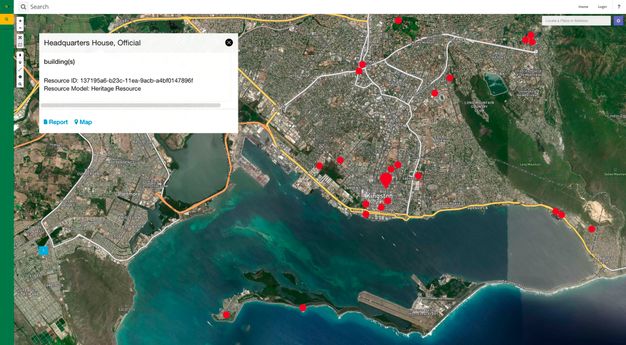
Jamaica National Inventory of Historic Places. The Jamaica Ministry of Culture, Gender, Entertainment and Sport, with support from the Organization of American States, implemented Arches for the Jamaica National Inventory of Historic Places (fig. 4.1). It is maintained and updated by staff of the Jamaica National Heritage Trust. See https://siteinventory.jnht.com/.
Additionally, several public agencies have implemented Arches to manage their heritage inventories for cities or urban areas, including:
-
Los Angeles Historic Resources Inventory. As mentioned above, the City of Los Angeles has deployed Arches as HistoricPlacesLA. It currently includes records of more than fifty thousand historic resources and districts. See https://hpla.lacity.org/.
-
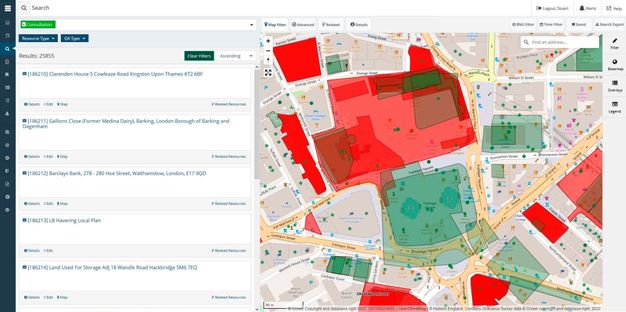
Greater London Historic Environment Record. Historic England has deployed Arches as the Greater London Historic Environment Record (GLHER) which is used to manage a heritage impact assessment consultation process (fig. 4.2).
-
Lincoln Historic Environment Record. As discussed in chapter 13, the City of Lincoln, U.K., has deployed Arches as its HER, branded Arcade, to manage the city’s archaeological and architectural heritage. See https://arcade.lincoln.gov.uk/.
-
City and County of San Francisco. The City and County of San Francisco has deployed Arches, known as SF Survey, as the city’s heritage inventory and as a tool to carry out a citywide survey. See https://sfculturalheritage.org.
-
Te Kaunihera o Tāmaki Makaurau / Auckland Council. In Aotearoa / New Zealand, Arches has been deployed to manage and publicly share information about heritage places in Tāmaki Makaurau / Auckland.
Arches is also being used to manage site-level heritage inventories. The Armed Forces Retirement Home (AFRH) is a U.S. federal agency that manages a 272-acre historic campus in Washington, D.C., that was established in 1851 for military veterans. The agency has deployed Arches as the AFRH Information and Resource Inventory System (AFRH-IRIS). Staff use IRIS to carry out campus planning and federal environmental compliance activities, and it is available for public research as well. See http://www.afrh-iris.com/.
Data Management
A fundamental aspect of Arches is that the platform is designed to enable implementers to manage the specific data they have defined by modifying the system to accommodate it. For example, the visual interface of Arches provides the ability to configure the underlying database and generate the necessary end-user interfaces without the need for software coding. Integrated with this configurability is the capacity for advanced management of controlled vocabularies. Arches also offers the ability to publish information online, including tools to fully control access to published information.
Additionally, Arches is built to support the ongoing work of heritage inventories and surveys to create, edit, update, and share data over the long term. This includes robust capabilities to create and edit geospatial data that describes locations. For those using ArcGIS Pro, the Arches Esri Add-In module facilitates a bidirectional link between ArcGIS Pro and Arches such that the creation or editing of spatial features and attributes in either software will be reflected in the other.
The data structure of Arches provides the ability to produce semantically enhanced, self-describing data according to internationally recognized standards, such as ISO 21127:2023—more commonly referred to as the CIDOC Conceptual Reference Model, or CIDOC CRM (International Organization for Standardization (ISO). 2023. Information and Documentation—A Reference Ontology for the Interchange of Cultural Heritage Information. ISO 21127:2023. Geneva: International Organization for Standardization. https://www.iso.org/standard/85100.html). This capability creates machine-readable data that is interoperable and portable. Because Arches uses common nonproprietary file formats, the structured data stored in Arches is software-platform independent and can be exported and migrated to other systems as necessary.
Data Visualization and Discovery
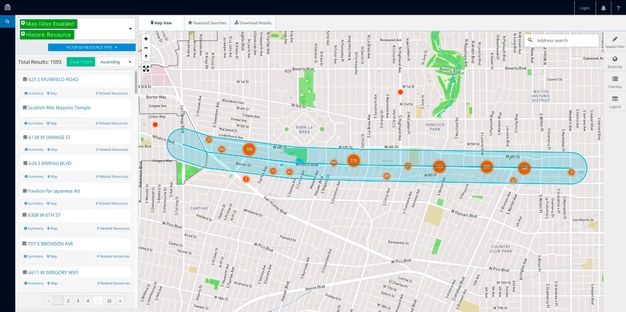
In addition to enabling data management, Arches features robust visualization and discovery tools. The most prominent means of visualization in Arches is its geospatial features, such as navigation via the map interface, search using map filters, and the inclusion of historic map layers and satellite imagery (fig. 4.3).
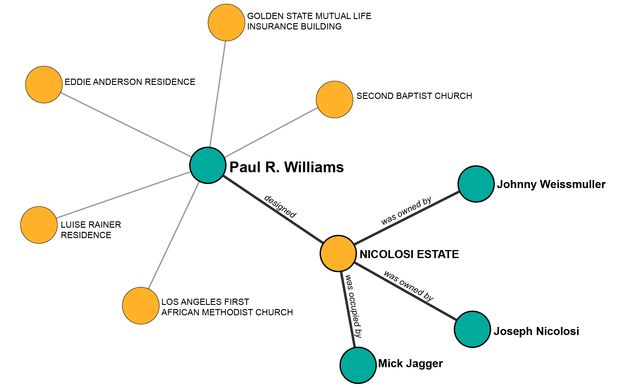
End users can also visually explore the relationships among resources in Arches and find new connections via the Related Resources network visualization. This capability allows relationships to be established among people, places, and things, including historical events and activities (fig. 4.4).
Another visually oriented tool is the Time Wheel, which represents all time data in any particular implementation in a circular histogram. This feature allows users to filter and search the distribution of temporal attributes of all resources in their Arches implementation (fig. 4.5).
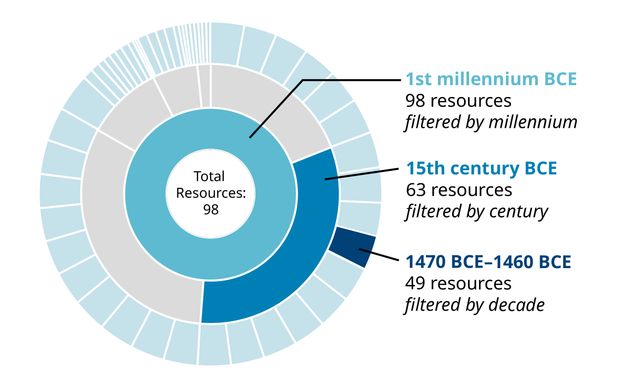
Arches includes discovery tools that allow for in-depth interrogation of data. In addition to the geospatial and time filters mentioned above, the ability to conduct semantic searches based on the underlying data structure and controlled vocabularies provides an important way to find data in Arches. Users also have access to an advanced search capability that allows them to query any specific data field.
An administrator of an independent Arches implementation can create predefined saved searches deemed to be of interest to users. For example, the City of Los Angeles’s deployment of Arches, HistoricPlacesLA, features an Entertainment Industry saved search on its homepage. All of these discovery tools can be used together to create powerful custom search queries.
Task and Project Management
Arches can be customized to accommodate an agency’s specific workflows or business processes, integrating the existing inventory data with the information entered during the steps of a workflow. For example, if a heritage agency needs to manage a process mandated by law, such as a heritage impact assessment, that agency can customize Arches to include a step-by-step workflow that accesses the existing inventory data and includes task tracking, notifications of deadlines, and management of correspondence to help ensure that the process is completed in the correct order and in a timely fashion.
Arches and Survey Integration
Surveys are an important data pipeline for heritage inventories, and Arches-powered inventories can integrate with survey efforts in several ways. The most effective method is to leverage Arches Workflows, which can be customized to create a step-by-step survey data entry process that can be accessed via a mobile or desktop web browser. Surveyors can collect data in the field if they have a network connection, and automatically populate their organization’s Arches implementation with the field survey data. Field data collection can be integrated with the research conducted by staff in the office, who can also use the shared Arches-powered system to record their research findings.
Another method to integrate survey data involves using other applications to collect survey data and importing the data via a separate process into Arches. Arches can bulk import large amounts of data via common file formats, such as CSV, JSON, and Shapefile, via a synchronous link to other systems using custom programming via an application programming interface (API), and via interaction with the underlying PostgreSQL database.
Arches Community and Long‑Term Aspirations
The Arches open-source project was established with a strategic aim of helping break the cycle of heritage organizations investing scarce resources in duplicative expenditures to independently create digital inventory and survey systems. The Arches open-source license obligates those who enhance the software to share those improvements for the benefit of the entire community. Related to this obligation, the customization of Arches for the Greater London Historic Environment Record (GLHER) has resulted in the Arches for HERs software package, which is based on the standards and requirements of England’s more than eighty regional and local agency HERs. It is freely available for any of England’s HERs to deploy.
The open-source approach ultimately enables pooling resources to provide both a greater combined investment to create more robust heritage inventory and survey software as well as all-around cost savings. The net result is a state-of-the-art software platform available to all organizations. If necessary, they can make marginal investments to tailor it to meet their particular requirements.
Its design is also intended to enable data to be used, updated, shared, and available for future generations. The GCI and WMF have aimed to build a self-sustaining, open-source community composed of a rich variety of institutions working collaboratively for the benefit of the international heritage field. Ultimately, Arches is envisioned as a modern, cost-saving tool to support the aim of worldwide heritage protection.
Notes
-
For more information on Arches, visit the project website (https://archesproject.org/). There, along with participating in the community forum, you can interact with an online demonstration version, download the software code, access documentation, view the project roadmap, and sign up for project updates. ↩︎